AFRICAST

Tidy time series & forecasting in R

Transformations, decompositions and features

Session 3 of 10

tsibble feasts fable
workshop.f4sg.org/africastForecasting for Social Good

Transforming time series

Variance stabilisation

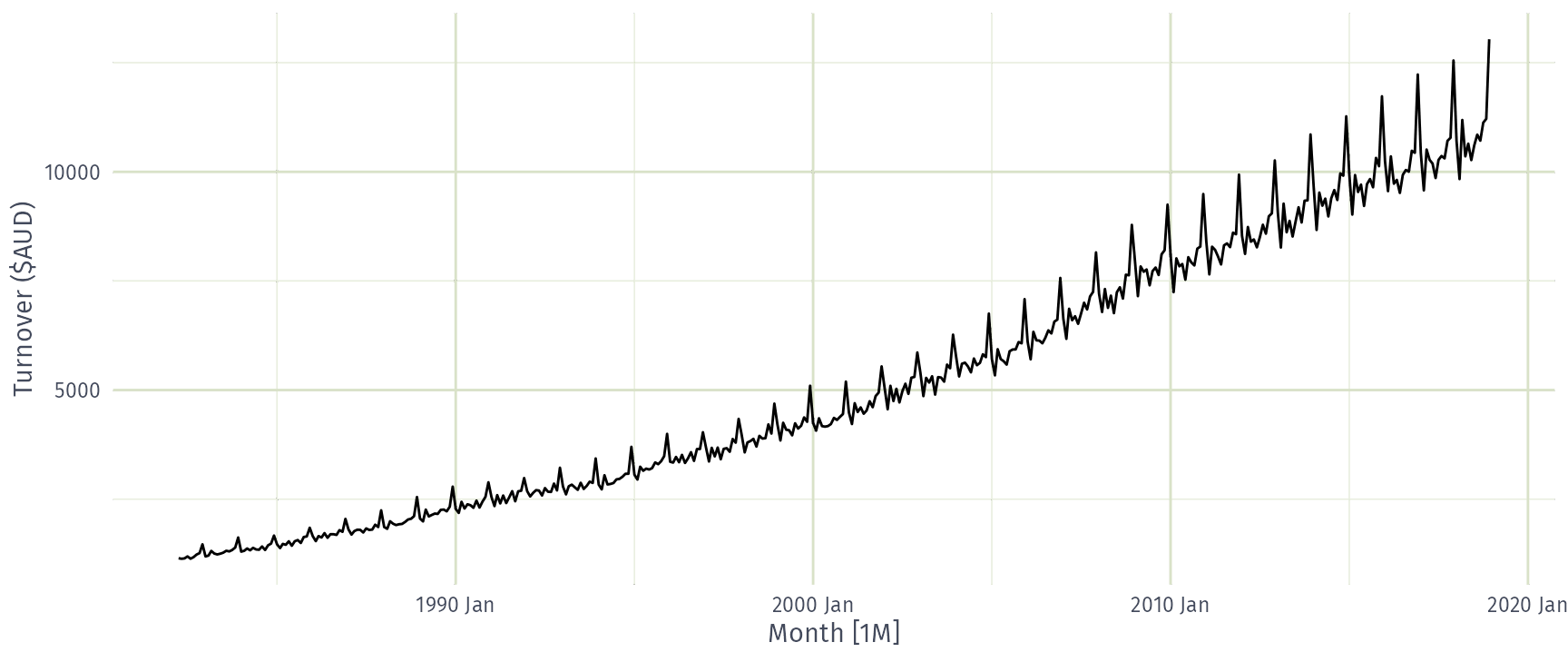
If the data show different variation at different levels of the series, then a transformation can be useful.

Denote original observations as \(y_1,\dots,y_n\) and transformed observations as \(w_1, \dots, w_n\).

Mathematical transformations for stabilising variation

\[\begin{array}{llc} \text{Square root} & w_t = \sqrt{y_t} & \downarrow \\ \text{Cube root} & w_t = \sqrt[3]{y_t} & \text{Increasing} \\ \text{Logarithm} & w_t = \text{log}(y_t) & \text{strength} \end{array}\]

Logarithms, in particular, are useful because they are more interpretable: changes in a log value are relative (percent) changes on the original scale.

Variance stabilisation

food <- aus_retail |>
  filter(Industry == "Food retailing") |>
  summarise(Turnover = sum(Turnover))

Variance stabilisation

food |> autoplot(sqrt(Turnover)) +
  labs(y = "Square root turnover")
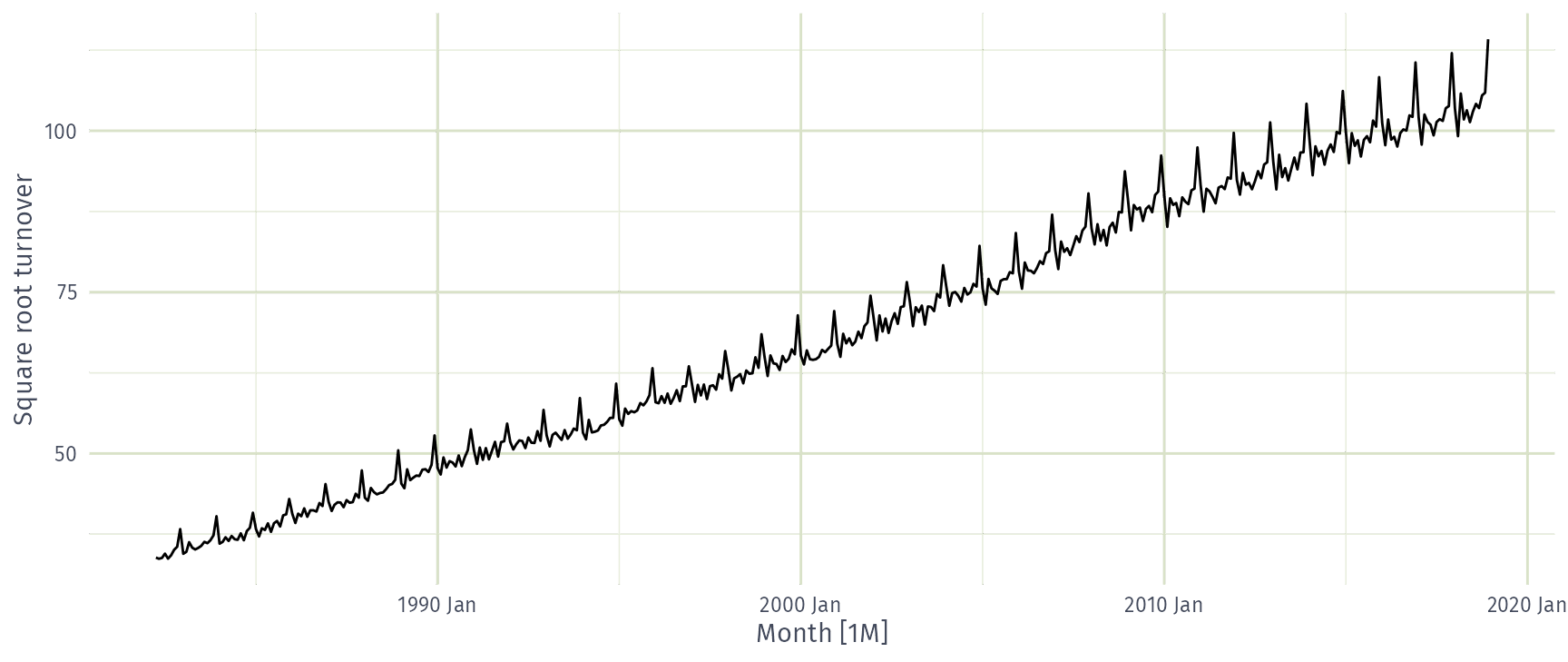
Variance stabilisation

food |> autoplot(Turnover^(1 / 3)) +
  labs(y = "Cube root turnover")
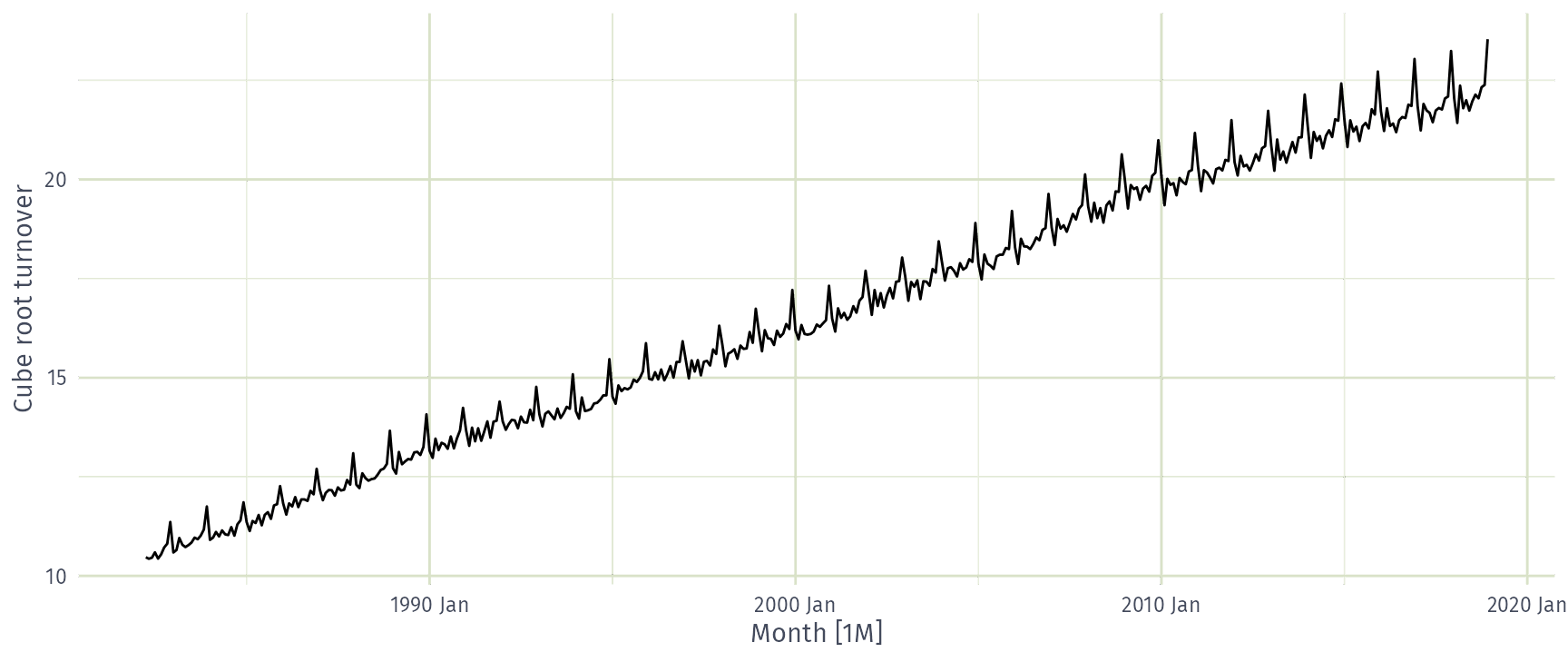
Variance stabilisation

food |> autoplot(log(Turnover)) +
  labs(y = "Log turnover")
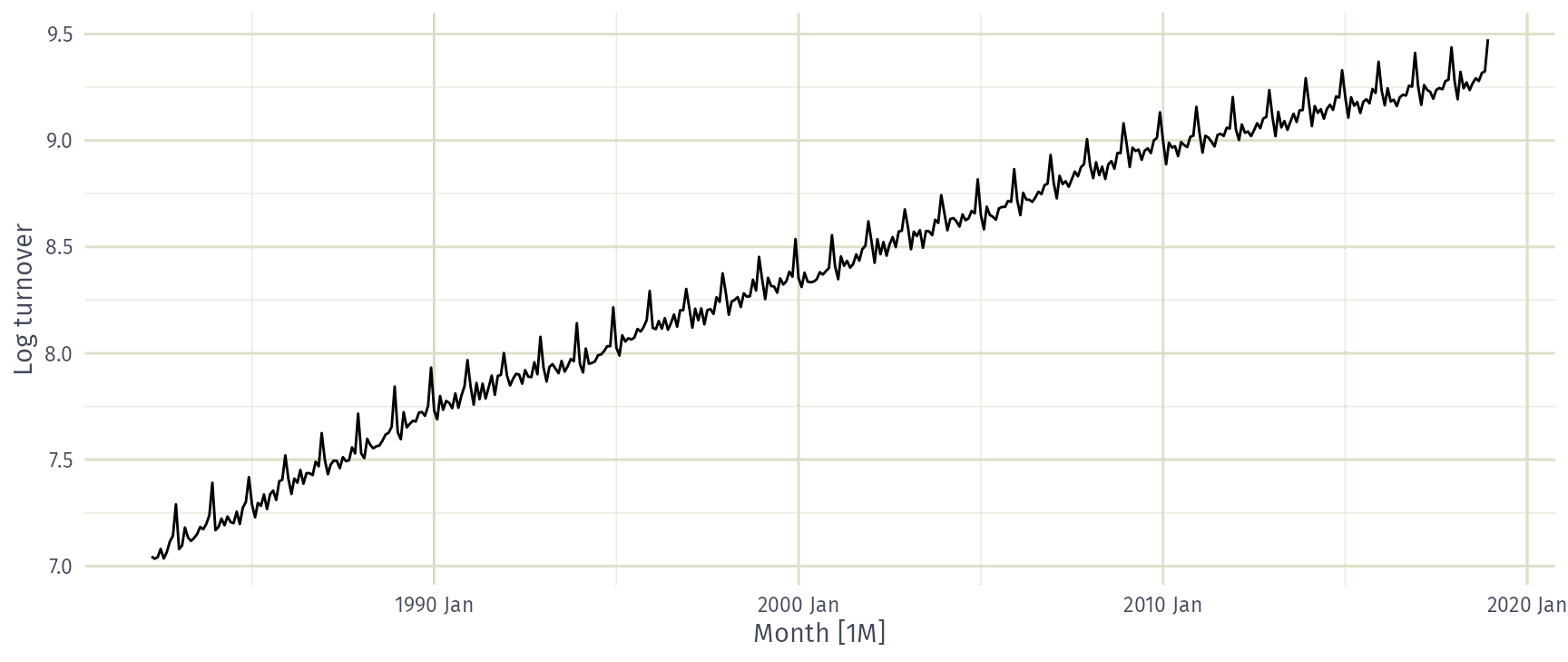
Variance stabilisation

food |> autoplot(-1 / Turnover) +
  labs(y = "Negative inverse turnover")
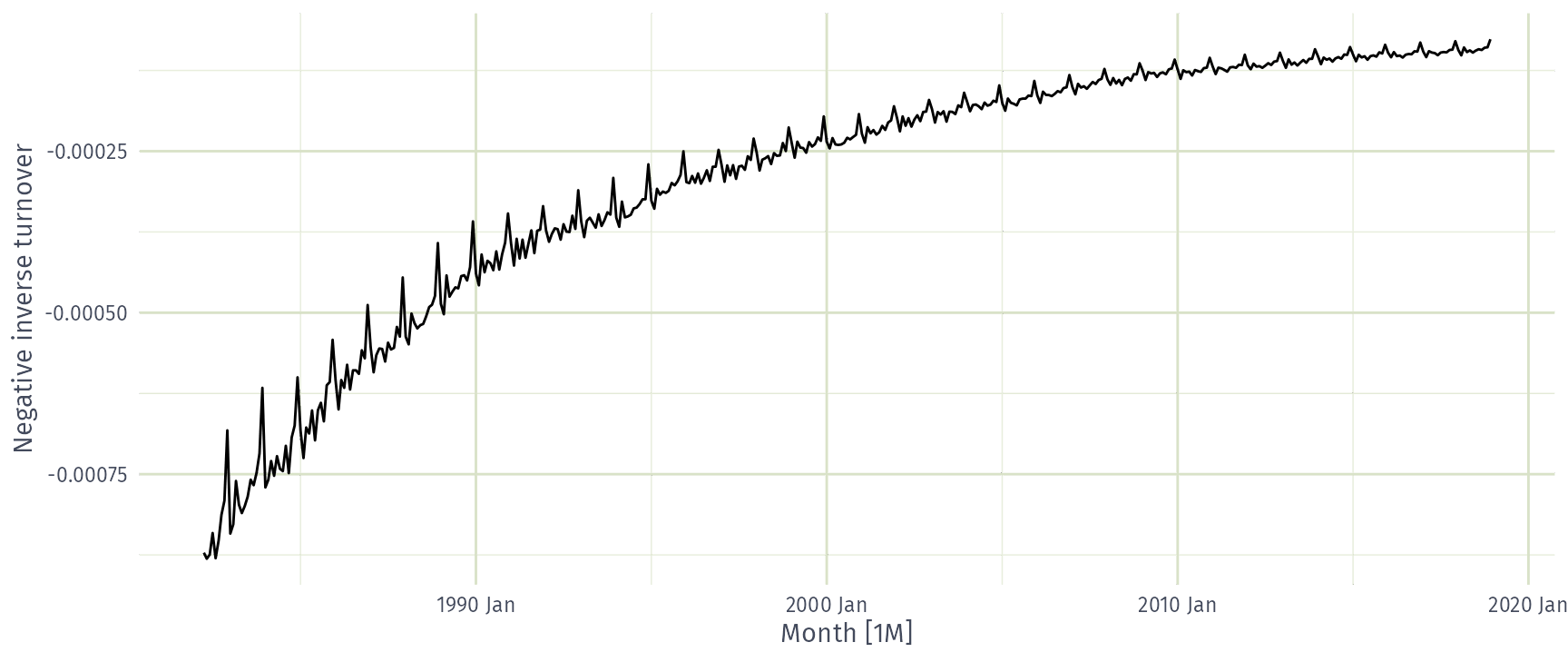
Variance stabilisation

Which transformation best stabilises the variance of food turnover?

  • Square root
  • Cube root
  • Logarithm
  • Inverse

Box-Cox transformations

Each of these transformations is close to a member of the family of Box-Cox transformations: \[w_t = \left\{\begin{array}{ll} \text{log}(y_t), & \quad \lambda = 0; \\ (\text{sign}(y_t)|y_t|^\lambda-1)/\lambda , & \quad \lambda \ne 0. \end{array}\right. \]

  • Actually the Bickel-Doksum transformation (allowing for \(y_t<0\))
  • \(\lambda=1\): (No substantive transformation)
  • \(\lambda=\frac12\): (Square root plus linear transformation)
  • \(\lambda=0\): (Natural logarithm)
  • \(\lambda=-1\): (Negative inverse plus 1)

Box-Cox transformations

Box-Cox transformations

What is the best value of λ for food retailing turnover?

Scale: −0.5–−0.3 · −0.3–−0.1 · −0.1–0.1 · 0.1–0.3 · 0.3–0.5 · 0.5–0.7 · 0.7–0.9 · 0.9–1.1

Box-Cox transformations

food |>
  features(Turnover, features = guerrero)
# A tibble: 1 × 1
  lambda_guerrero
            <dbl>
1          0.0895
  • This attempts to balance the seasonal fluctuations and random variation across the series.
  • Always check the results.
  • A low value of \(\lambda\) can give extremely large prediction intervals.

Box-Cox transformations

food |> autoplot(box_cox(Turnover, 0.0895)) +
  labs(y = "Box-Cox transformed turnover")
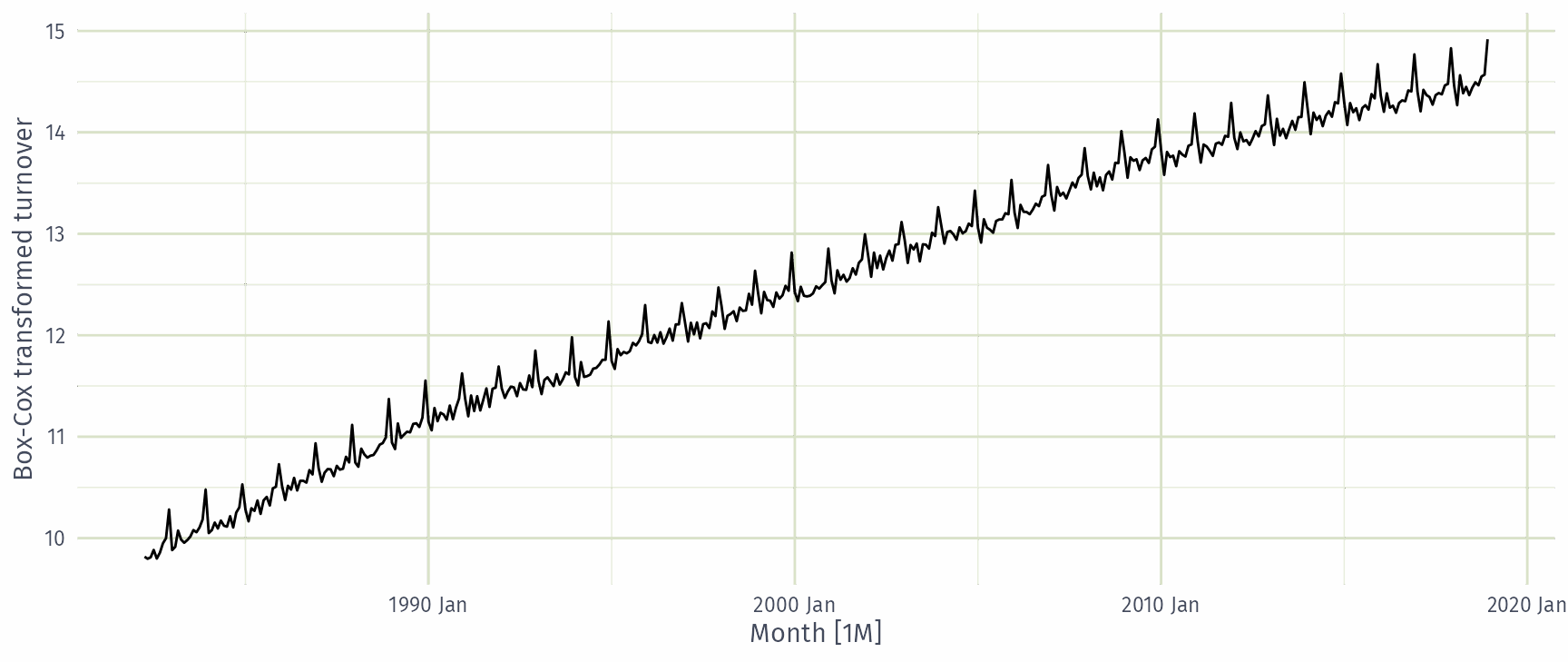
Transformations

  • Often no transformation needed.
  • Simple transformations are easier to explain and work well enough.
  • Transformations can have very large effect on PI.
  • If some data are zero or negative, then use \(\lambda>0\).
  • log1p() can also be useful for data with zeros.
  • Choosing logs is a simple way to force forecasts to be positive
  • Transformations must be reversed to obtain forecasts on the original scale. (Handled automatically by fable.)

Adjusting time series

Adjusting time series

Besides purely mathematical transformations, what adjustments could make a time series easier to forecast?

Per capita adjustments

global_economy |>
  filter(Country == "Australia") |>
  autoplot(GDP)
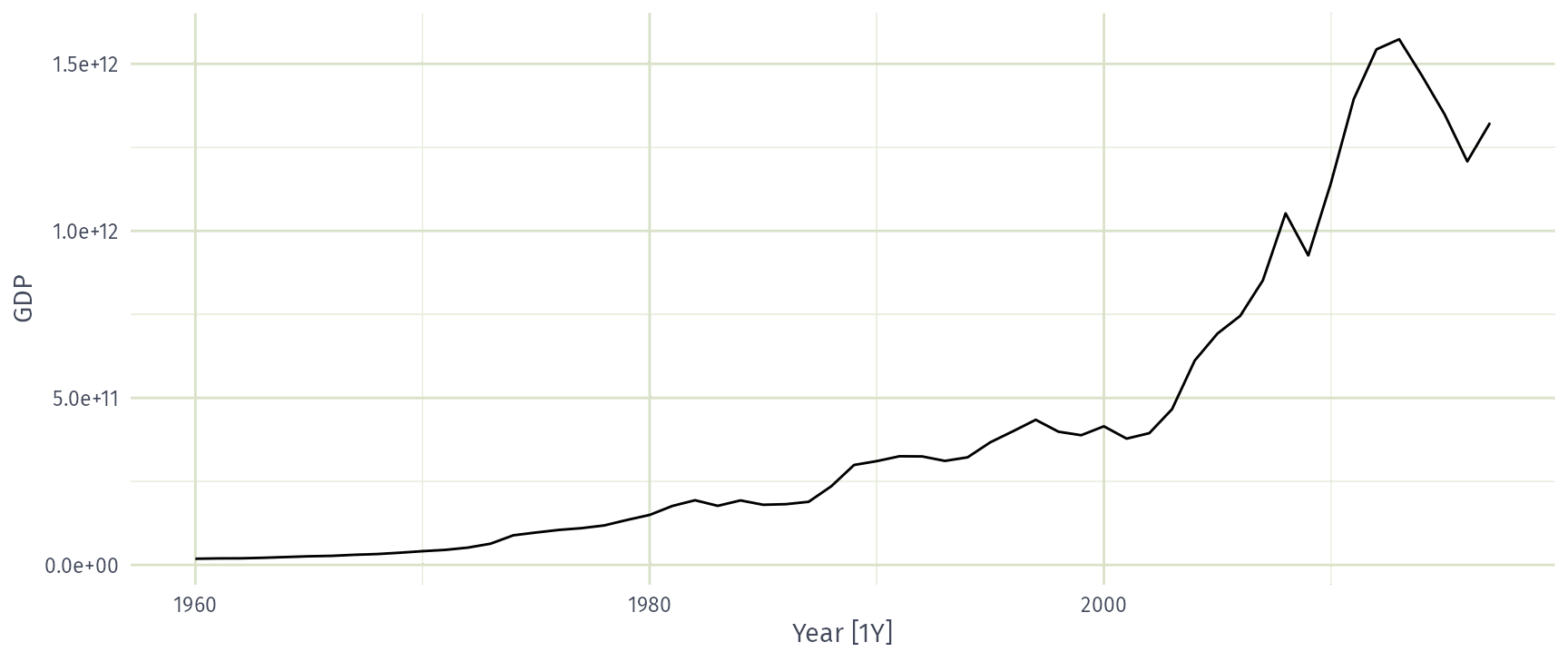
Per capita adjustments

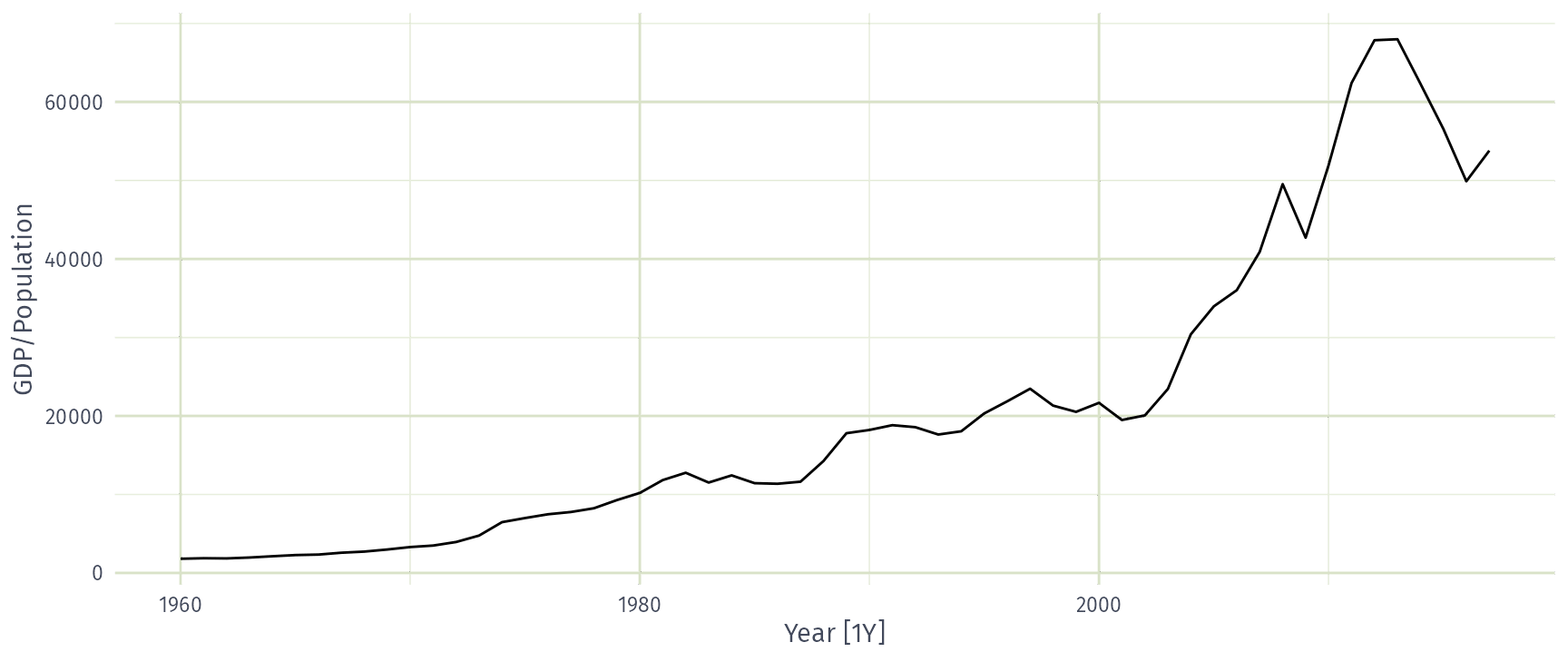
global_economy |>
  filter(Country == "Australia") |>
  autoplot(GDP / Population)
Inflation adjustments
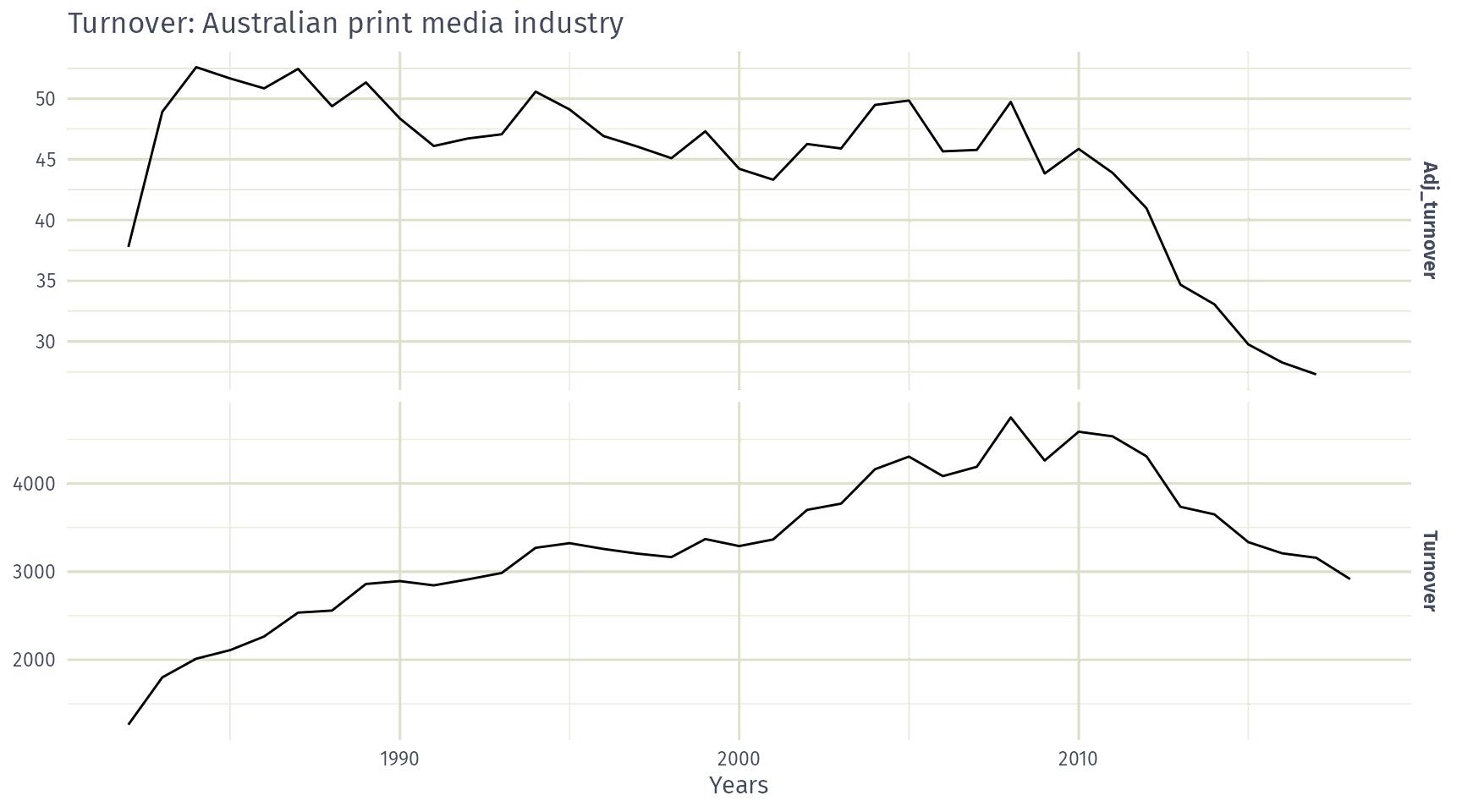
print_retail <- aus_retail |>
  filter(Industry == "Newspaper and book retailing") |>
  group_by(Industry) |>
  index_by(Year = year(Month)) |>
  summarise(Turnover = sum(Turnover))
aus_economy <- filter(global_economy, Country == "Australia")
print_retail |>
  left_join(aus_economy, by = "Year") |>
  mutate(Adj_turnover = Turnover / CPI) |>
  pivot_longer(c(Turnover, Adj_turnover),
    names_to = "Type", values_to = "Turnover"
  ) |>
  ggplot(aes(x = Year, y = Turnover)) +
  geom_line() +
  facet_grid(vars(Type), scales = "free_y") +
  labs(x = "Years", y = NULL,
       title = "Turnover: Australian print media industry")

Inflation adjustments

Time series decompositions

Time series decomposition

Trend-Cycle
aperiodic changes in level over time.
Seasonal
(almost) periodic changes in level due to seasonal factors (e.g., the quarter of the year, the month, or day of the week).

Additive decomposition

\[ y_t = S_t + T_t + R_t \]

\[\begin{aligned} \text{where}\quad & y_t = \text{ data at period } t \\ & T_t = \text{ trend-cycle component at period } t \\ & S_t = \text{ seasonal component at period } t \\ & R_t = \text{ remainder component at period } t \end{aligned}\]

STL decomposition

  • STL: “Seasonal and Trend decomposition using Loess”
  • Very versatile and robust.
  • Seasonal component allowed to change over time, and rate of change controlled by user.
  • Smoothness of trend-cycle also controlled by user.
  • Optionally robust to outliers
  • No trading day or calendar adjustments.
  • Only additive.
  • Take logs to get multiplicative decomposition.
  • Use Box-Cox transformations to get other decompositions.

US Retail Employment

us_retail_employment <- us_employment |>
  filter(year(Month) >= 1990, Title == "Retail Trade") |>
  select(-Series_ID)
us_retail_employment
# A tsibble: 357 x 3 [1M]
      Month Title        Employed
      <mth> <chr>           <dbl>
 1 1990 Jan Retail Trade   13256.
 2 1990 Feb Retail Trade   12966.
 3 1990 Mar Retail Trade   12938.
 4 1990 Apr Retail Trade   13012.
 5 1990 May Retail Trade   13108.
 6 1990 Jun Retail Trade   13183.
 7 1990 Jul Retail Trade   13170.
 8 1990 Aug Retail Trade   13160.
 9 1990 Sep Retail Trade   13113.
10 1990 Oct Retail Trade   13185.
# ℹ 347 more rows

US Retail Employment

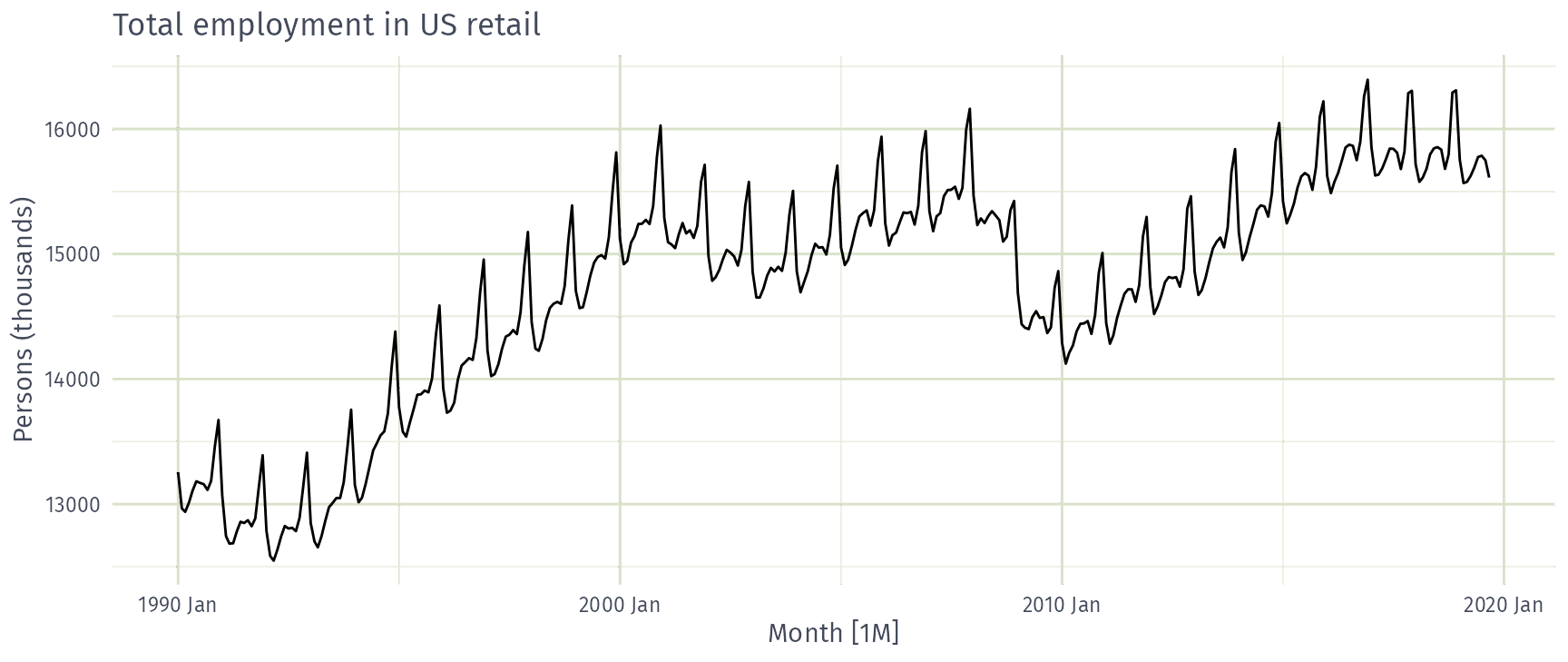
us_retail_employment |>
  autoplot(Employed) +
  labs(y = "Persons (thousands)", title = "Total employment in US retail")
US Retail Employment

dcmp <- us_retail_employment |>
  model(stl = STL(Employed))
dcmp
# A mable: 1 x 1
      stl
  <model>
1   <STL>

US Retail Employment

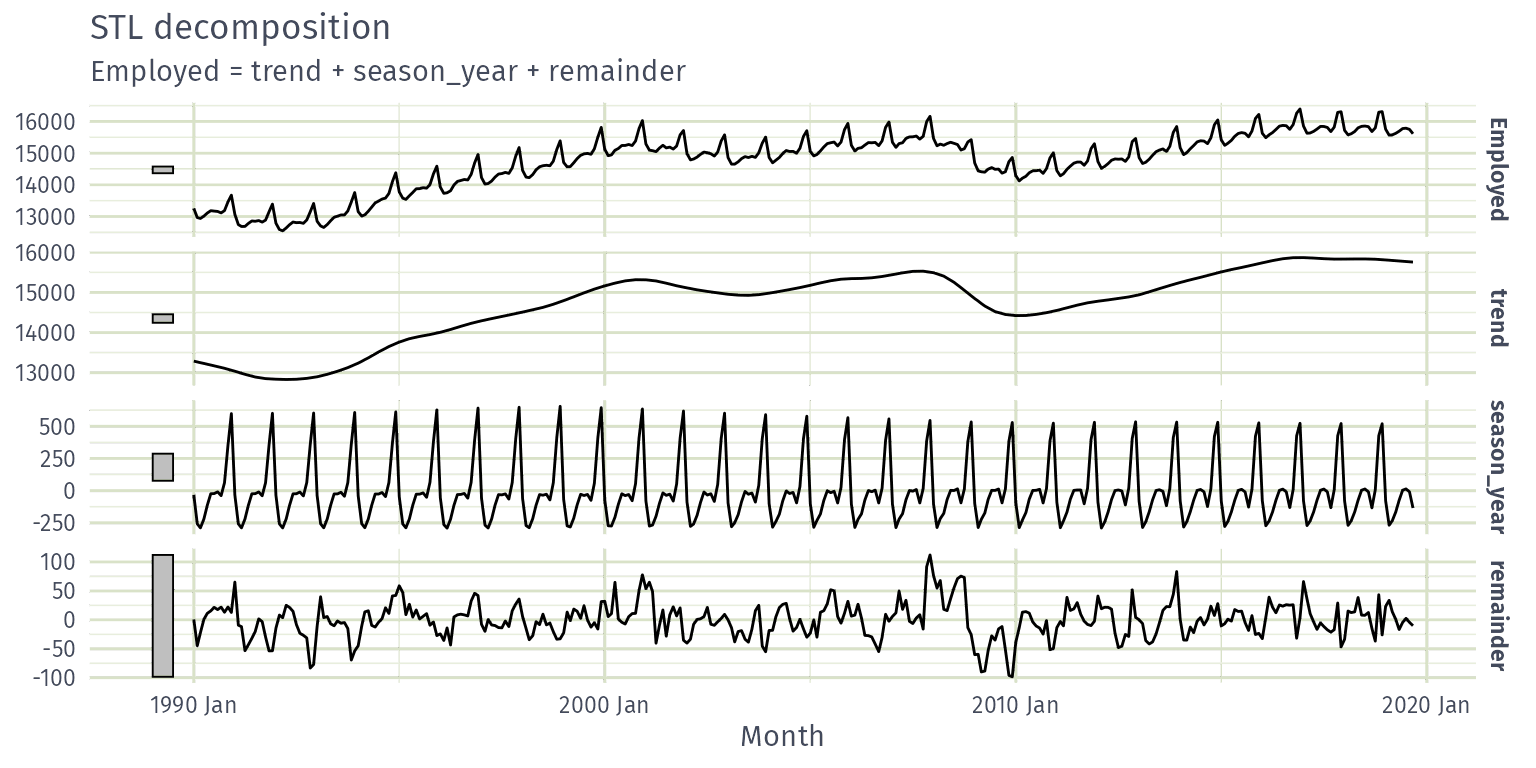
components(dcmp)
# A dable: 357 x 7 [1M]
# Key:     .model [1]
# :        Employed = trend + season_year + remainder
   .model    Month Employed  trend season_year remainder season_adjust
   <chr>     <mth>    <dbl>  <dbl>       <dbl>     <dbl>         <dbl>
 1 stl    1990 Jan   13256. 13288.      -33.0      0.836        13289.
 2 stl    1990 Feb   12966. 13269.     -258.     -44.6          13224.
 3 stl    1990 Mar   12938. 13250.     -290.     -22.1          13228.
 4 stl    1990 Apr   13012. 13231.     -220.       1.05         13232.
 5 stl    1990 May   13108. 13211.     -114.      11.3          13223.
 6 stl    1990 Jun   13183. 13192.      -24.3     15.5          13207.
 7 stl    1990 Jul   13170. 13172.      -23.2     21.6          13193.
 8 stl    1990 Aug   13160. 13151.       -9.52    17.8          13169.
 9 stl    1990 Sep   13113. 13131.      -39.5     22.0          13153.
10 stl    1990 Oct   13185. 13110.       61.6     13.2          13124.
# ℹ 347 more rows

US Retail Employment

components(dcmp) |> autoplot()
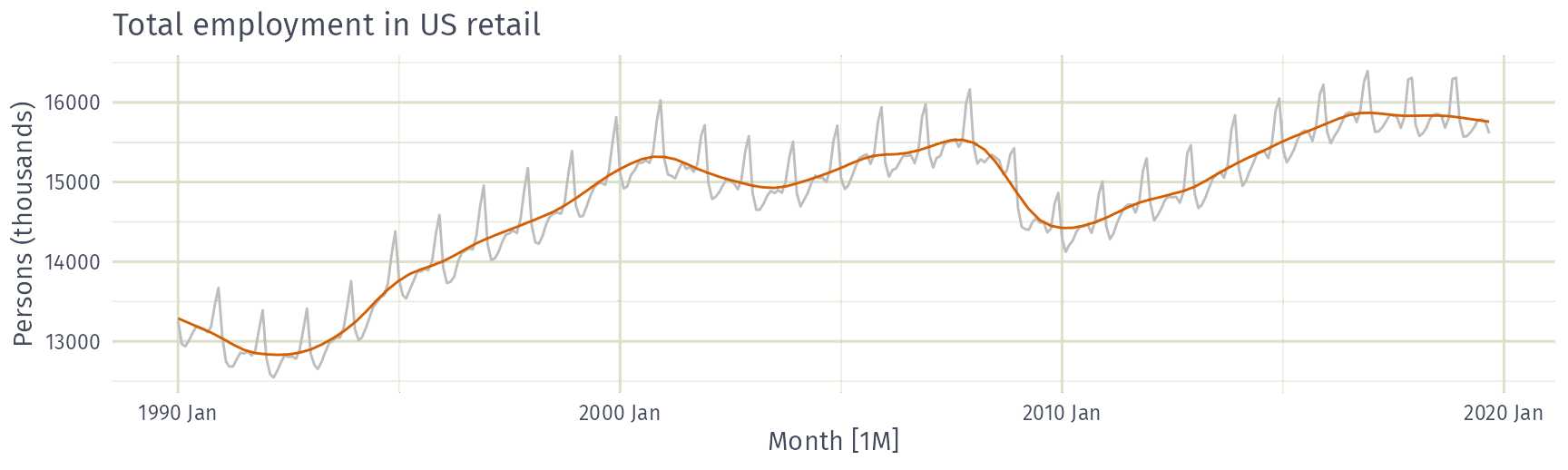
US Retail Employment

us_retail_employment |>
  autoplot(Employed, color = "gray") +
  autolayer(components(dcmp), trend, color = "#D55E00") +
  labs(y = "Persons (thousands)", title = "Total employment in US retail")
US Retail Employment

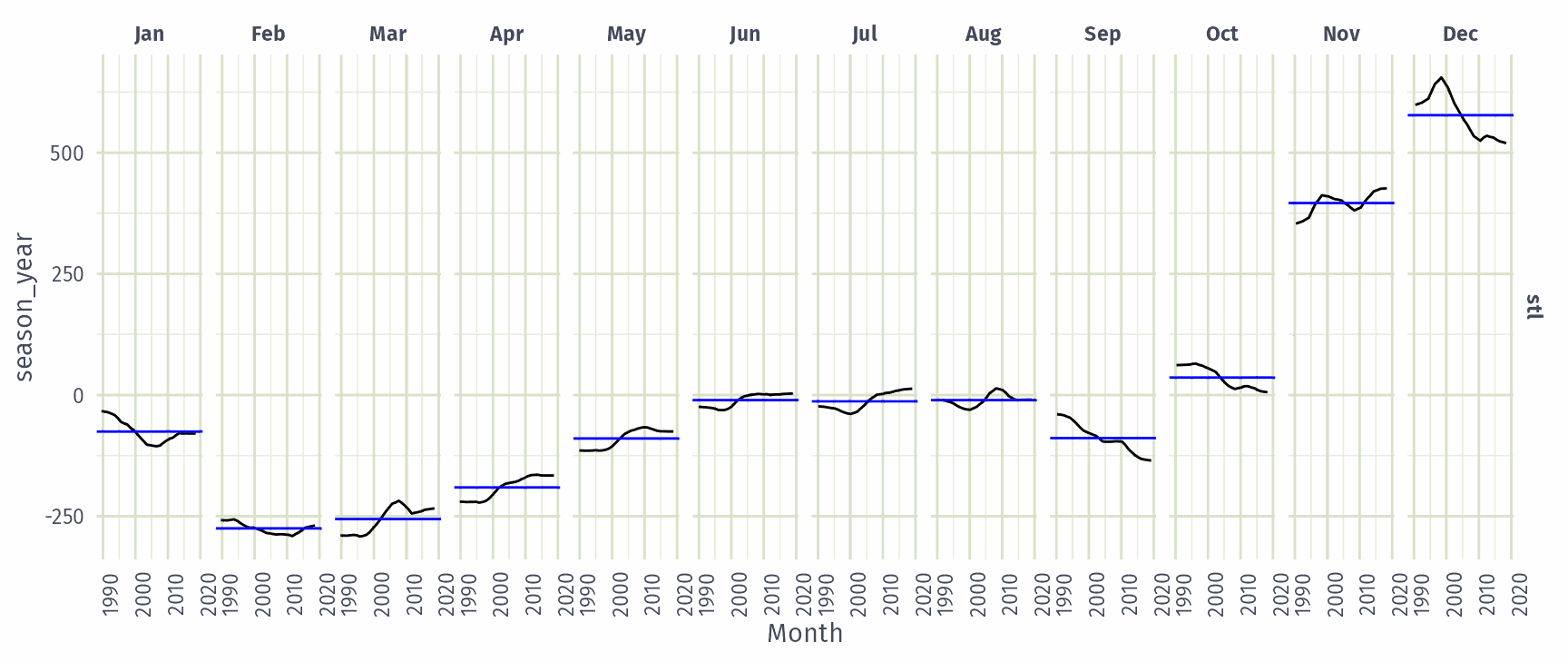
components(dcmp) |> gg_subseries(season_year)
US Retail Employment

In which month does US retail employment peak?

  • March
  • July
  • October
  • December

US Retail Employment

How is the December peak in US retail employment changing over time?

  • Getting larger
  • Getting smaller
  • Staying the same
  • Grew, then shrank

Seasonal adjustment

  • Useful by-product of decomposition: an easy way to calculate seasonally adjusted data.
  • Additive decomposition: seasonally adjusted data given by \[y_t - S_t = T_t + R_t\]
  • Multiplicative decomposition: seasonally adjusted data given by \[y_t / S_t = T_t \times R_t\]

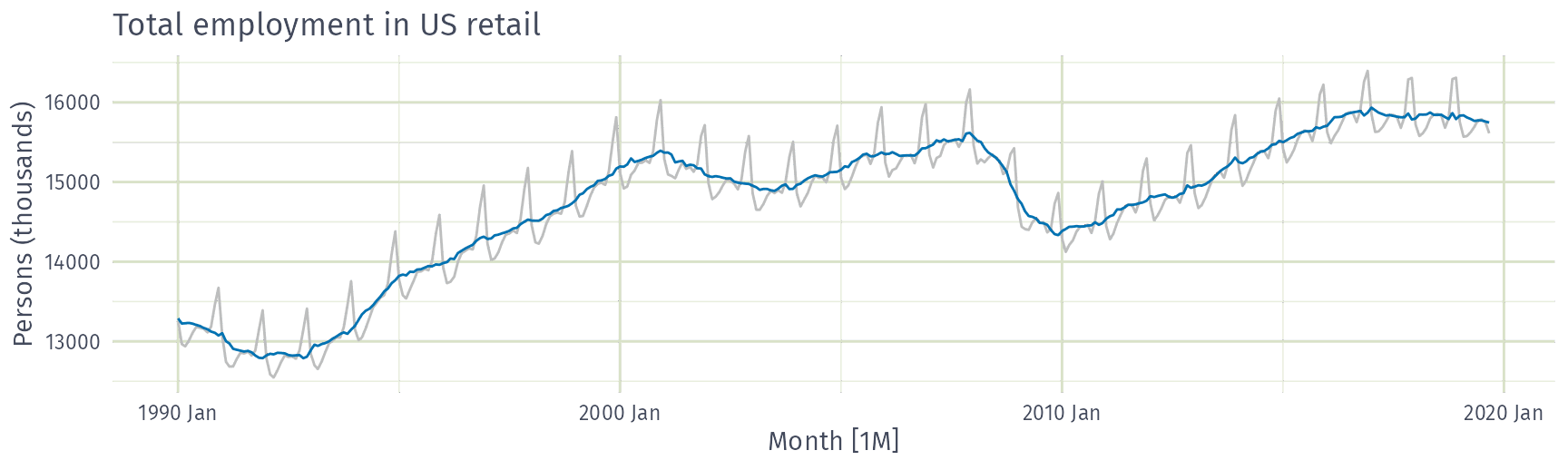
US Retail Employment

us_retail_employment |>
  autoplot(Employed, color = "gray") +
  autolayer(components(dcmp), season_adjust, color = "#0072B2") +
  labs(y = "Persons (thousands)", title = "Total employment in US retail")
Seasonal adjustment

  • We use estimates of \(S\) based on past values to seasonally adjust a current value.
  • Seasonally adjusted series reflect remainders as well as trend. Therefore they are not “smooth” and “downturns” or “upturns” can be misleading.
  • It is better to use the trend-cycle component to look for turning points.

STL decomposition

STL decomposition

us_retail_employment |>
  model(STL(Employed ~ trend(window = 15) + season(window = "periodic"),
    robust = TRUE
  )) |>
  components()
  • trend(window = ?) controls wiggliness of trend component.
  • season(window = ?) controls variation on seasonal component.
  • season(window = 'periodic') is equivalent to an infinite window.

STL decomposition

us_retail_employment |>
  model(STL(Employed)) |>
  components() |>
  autoplot()
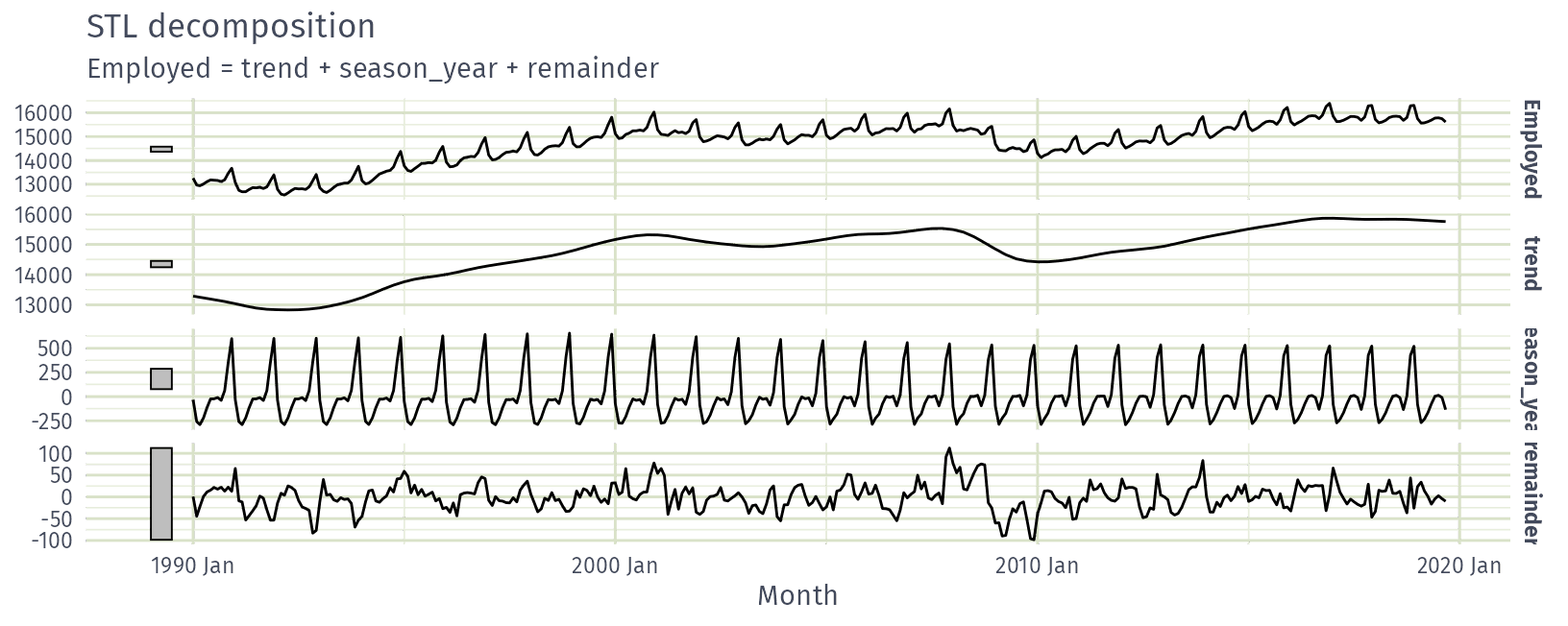
  • STL() chooses season(window=13) by default
  • Can include transformations.

STL decomposition

  • Algorithm that updates trend and seasonal components iteratively.
  • Starts with \(\hat{T}_t=0\)
  • Uses a mixture of loess and moving averages to successively refine the trend and seasonal estimates.
  • trend window controls loess bandwidth on deseasonalised values.
  • season window controls loess bandwidth on detrended subseries.
  • Robustness weights based on remainder.
  • Default season: window = 13
  • Default trend: window = nextodd(ceiling((1.5*period)/(1-(1.5/s.window))))
  • window values should be odd numbers for symmetry.

Australian holidays

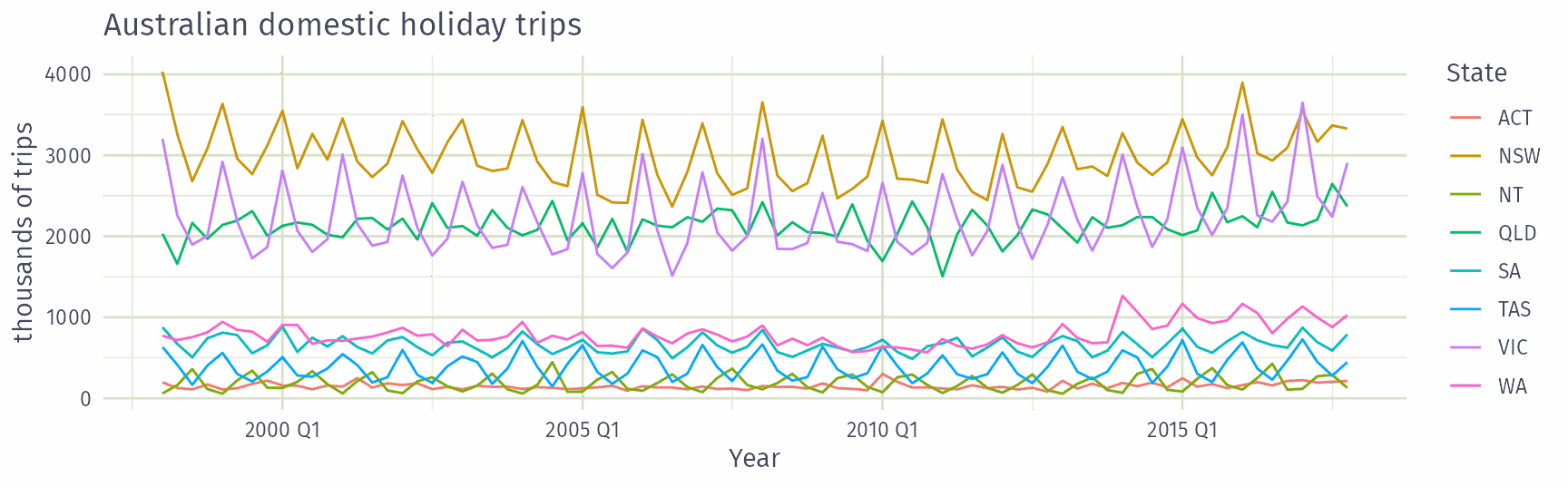
holidays |> autoplot(Trips) +
  labs(y = "thousands of trips", x = "Year",
       title = "Australian domestic holiday trips")
Australian holidays

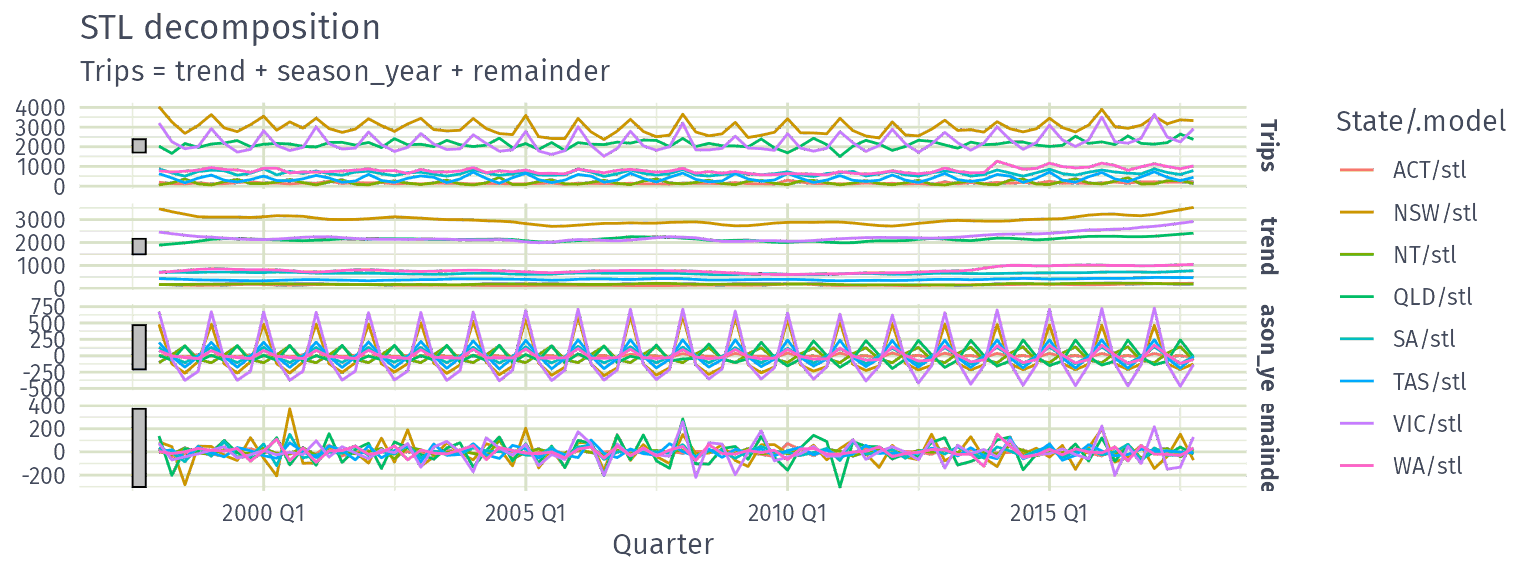
holidays |>
  model(stl = STL(Trips)) |>
  components() |>
  autoplot()
Holidays decomposition

dcmp <- holidays |>
  model(stl = STL(Trips)) |>
  components()
dcmp
# A dable: 640 x 8 [1Q]
# Key:     State, .model [8]
# :        Trips = trend + season_year + remainder
   State .model Quarter Trips trend season_year remainder season_adjust
   <chr> <chr>    <qtr> <dbl> <dbl>       <dbl>     <dbl>         <dbl>
 1 ACT   stl    1998 Q1  196.  172.       -8.48     32.6           205.
 2 ACT   stl    1998 Q2  127.  157.       10.3     -40.6           116.
 3 ACT   stl    1998 Q3  111.  142.      -16.8     -14.5           128.
 4 ACT   stl    1998 Q4  170.  130.       14.6      25.6           156.
 5 ACT   stl    1999 Q1  108.  135.       -8.63    -18.3           116.
 6 ACT   stl    1999 Q2  125.  148.       11.0     -34.6           114.
 7 ACT   stl    1999 Q3  178.  166.      -16.0      28.3           194.
 8 ACT   stl    1999 Q4  218.  177.       13.2      27.5           204.
 9 ACT   stl    2000 Q1  158.  169.       -8.75     -1.96          167.
10 ACT   stl    2000 Q2  155.  151.       11.7      -8.20          143.
# ℹ 630 more rows

Holidays decomposition

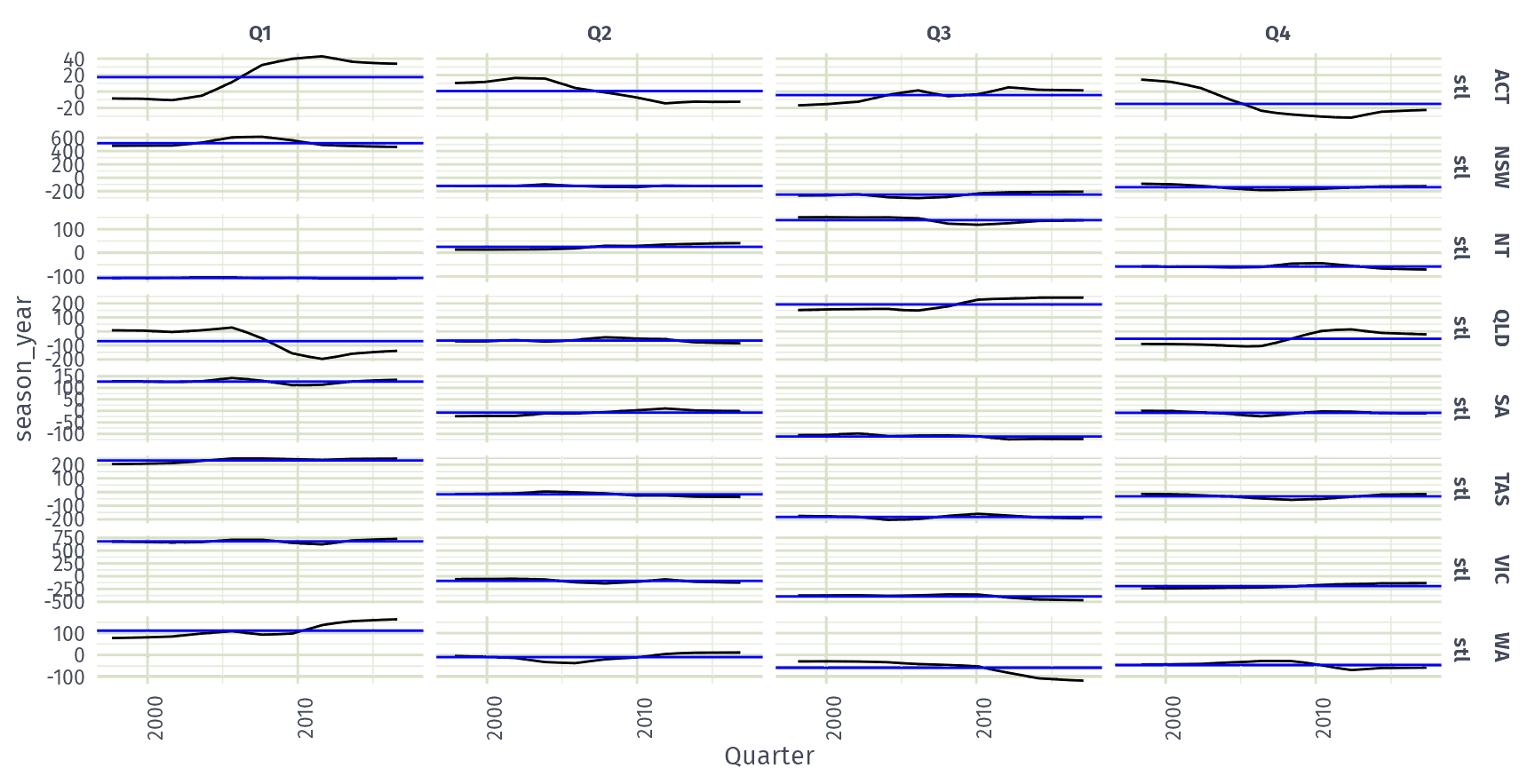
dcmp |> gg_subseries(season_year)
Holidays decomposition

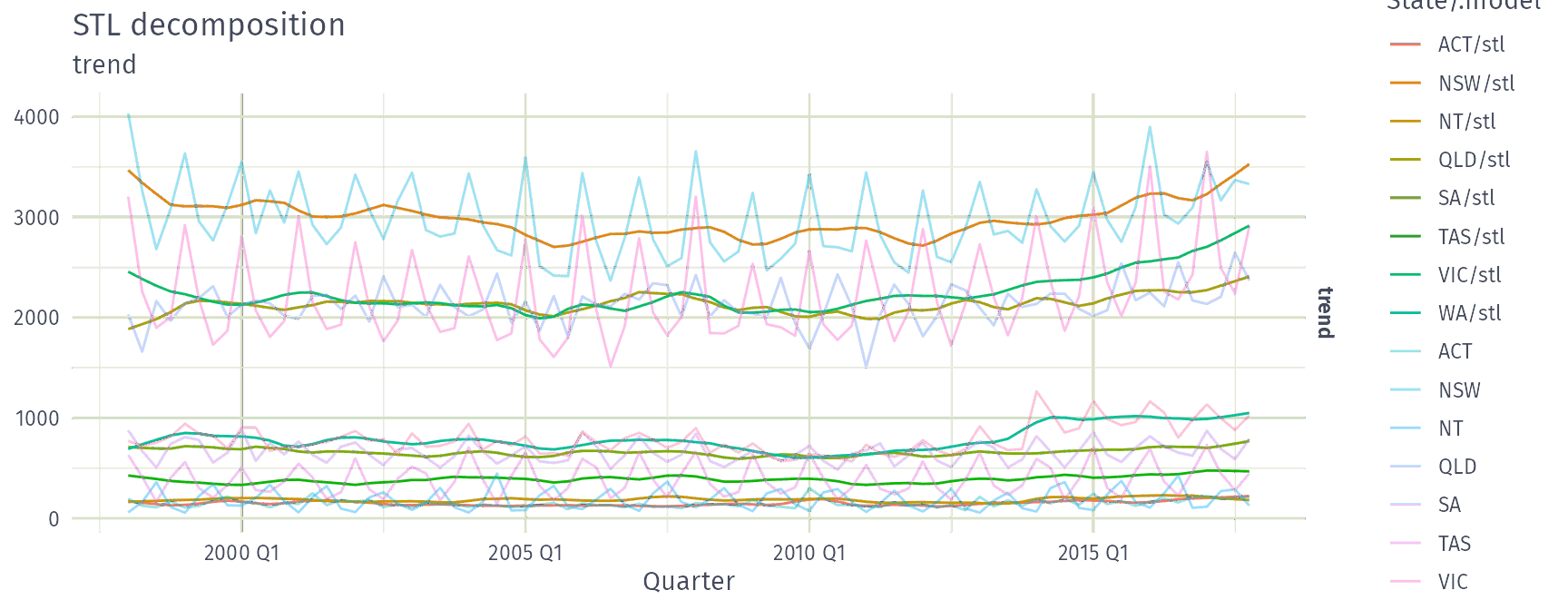
autoplot(dcmp, trend, scale_bars = FALSE) +
  autolayer(holidays, alpha = 0.4)
STL Features

Strength of seasonality and trend

STL decomposition

\(y_t = T_t+S_t+R_t\)

Seasonal strength

\[\max\left(0, 1-\frac{\text{Var}(R_t)}{\text{Var}(S_t+R_t)}\right)\]

Trend strength

\[\max\left(0, 1-\frac{\text{Var}(R_t)}{\text{Var}(T_t+R_t)}\right)\]

Both range from 0 (none) to 1 (strong), computed by feat_stl().

STL features

tourism: quarterly overnight trips (thousands) for 304 Australian domestic series, keyed by Region, State and Purpose.

tourism |> features(Trips, feat_stl)
# A tibble: 304 × 12
   Region         State Purpose trend_strength seasonal_strength_year seasonal_peak_year
   <chr>          <chr> <chr>            <dbl>                  <dbl>              <dbl>
 1 Adelaide       SA    Busine…          0.464                  0.407                  3
 2 Adelaide       SA    Holiday          0.554                  0.619                  1
 3 Adelaide       SA    Other            0.746                  0.202                  2
 4 Adelaide       SA    Visiti…          0.435                  0.452                  1
 5 Adelaide Hills SA    Busine…          0.464                  0.179                  3
 6 Adelaide Hills SA    Holiday          0.528                  0.296                  2
 7 Adelaide Hills SA    Other            0.593                  0.404                  2
 8 Adelaide Hills SA    Visiti…          0.488                  0.254                  0
 9 Alice Springs  NT    Busine…          0.534                  0.251                  0
10 Alice Springs  NT    Holiday          0.381                  0.832                  3
# ℹ 294 more rows
# ℹ 6 more variables: seasonal_trough_year <dbl>, spikiness <dbl>, linearity <dbl>,
#   curvature <dbl>, stl_e_acf1 <dbl>, stl_e_acf10 <dbl>

STL features

  • trend_strength, seasonal_strength_year: strength of the trend and seasonal components.
  • seasonal_peak_year, seasonal_trough_year: the quarter with the largest and smallest seasonal component.
  • spikiness: prevalence of spikes in the remainder.
  • linearity, curvature: shape of the trend, from a quadratic regression on time.
  • stl_e_acf1: first autocorrelation of the remainder.
  • stl_e_acf10: sum of squares of the first ten autocorrelations of the remainder.

Seasonal and trend strength

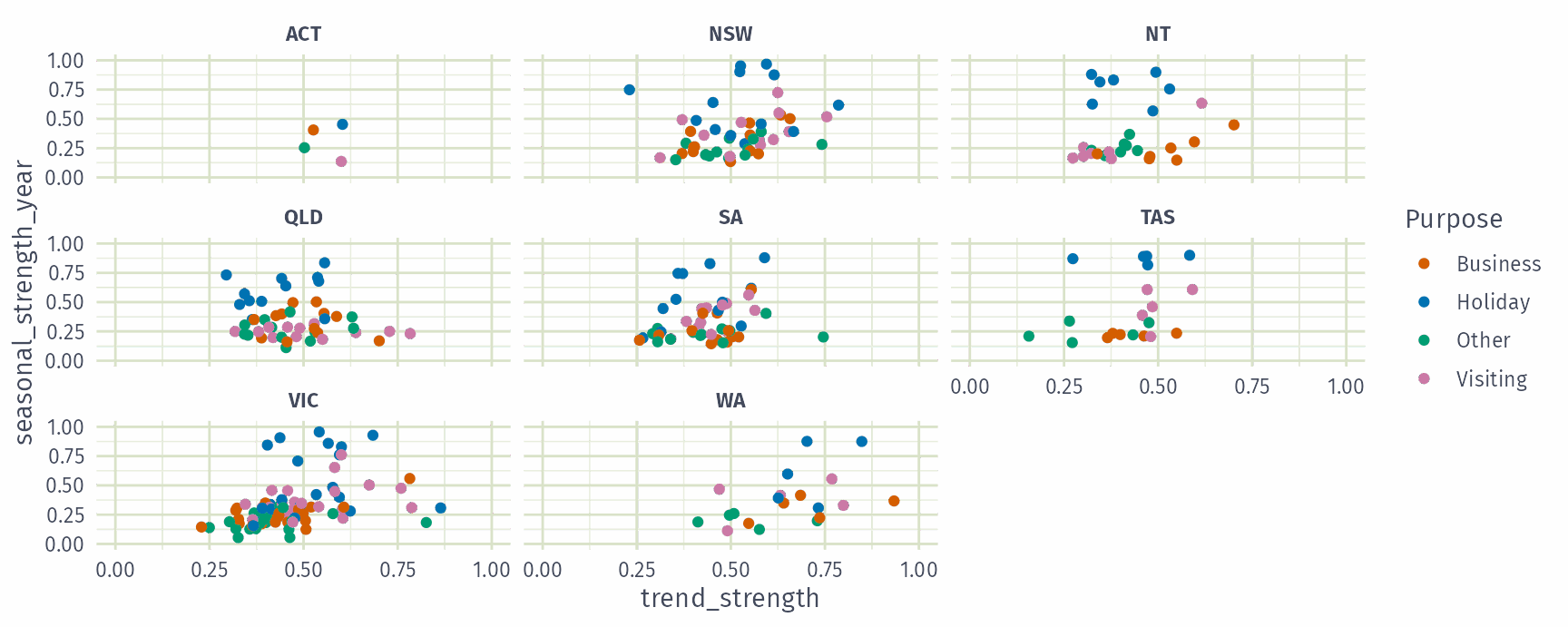
tourism |>
  features(Trips, feat_stl) |>
  ggplot(aes(x = trend_strength, y = seasonal_strength_year, col = Purpose)) +
  geom_point() + facet_wrap(vars(State)) +
  coord_cartesian(xlim = c(0, 1), ylim = c(0, 1))
Seasonal and trend strength
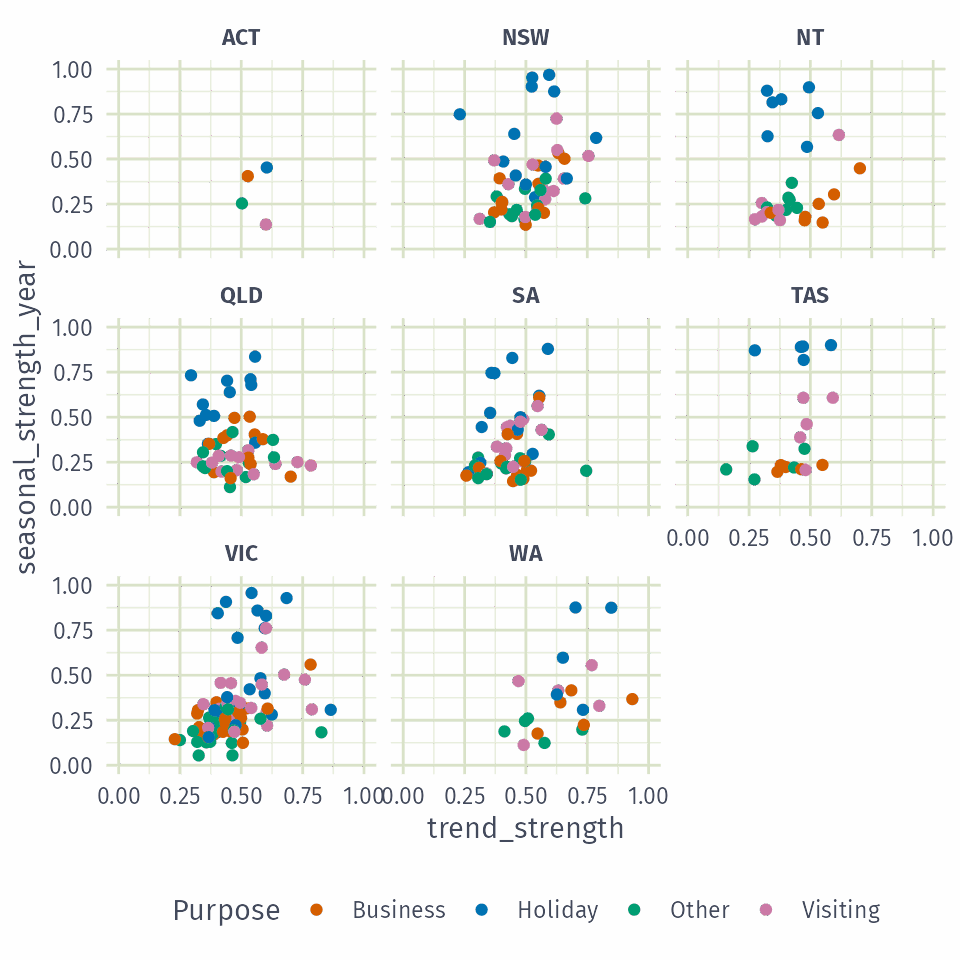
Which travel purpose is most seasonal?

  • Business
  • Holiday
  • Other
  • Visiting
  • Holidays more seasonal than other travel.
  • WA series tend to have the strongest trends.

Most seasonal and most trended series

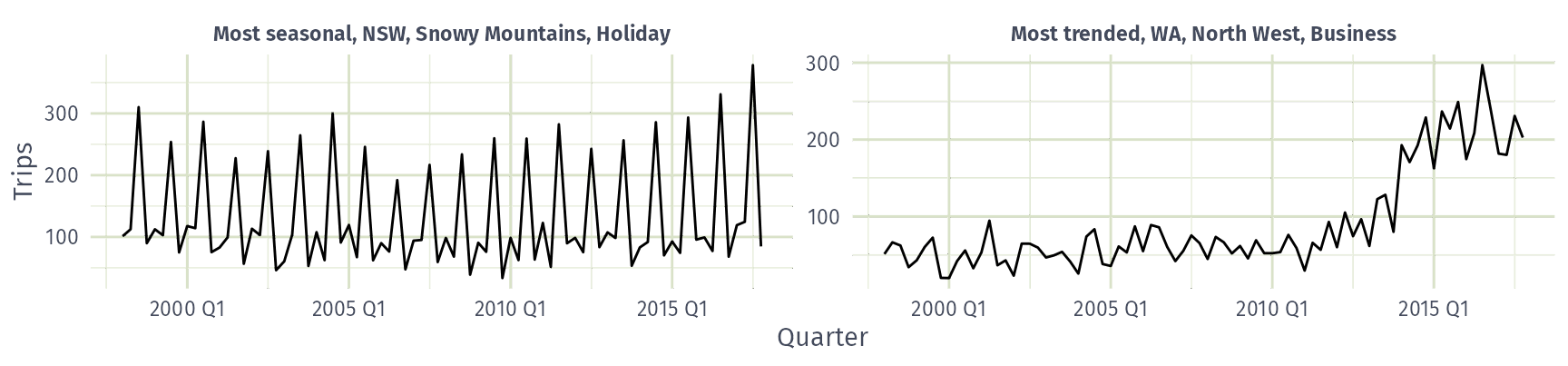
stl_features <- tourism |> features(Trips, feat_stl)
extremes <- bind_rows(
  "Most seasonal" = slice_max(stl_features, seasonal_strength_year),
  "Most trended" = slice_max(stl_features, trend_strength),
  .id = "Feature"
)
tourism |>
  inner_join(extremes, by = join_by(State, Region, Purpose)) |>
  ggplot(aes(x = Quarter, y = Trips)) +
  geom_line() +
  facet_wrap(vars(Feature, State, Region, Purpose), scales = "free_y",
    labeller = labeller(.multi_line = FALSE))
ACF features

tourism |> features(Trips, feat_acf)
# A tibble: 304 × 10
   Region     State Purpose     acf1 acf10 diff1_acf1 diff1_acf10 diff2_acf1 diff2_acf10
   <chr>      <chr> <chr>      <dbl> <dbl>      <dbl>       <dbl>      <dbl>       <dbl>
 1 Adelaide   SA    Busine…  0.0333  0.131     -0.520       0.463     -0.676       0.741
 2 Adelaide   SA    Holiday  0.0456  0.372     -0.343       0.614     -0.487       0.558
 3 Adelaide   SA    Other    0.517   1.15      -0.409       0.383     -0.675       0.792
 4 Adelaide   SA    Visiti…  0.0684  0.294     -0.394       0.452     -0.518       0.447
 5 Adelaide … SA    Busine…  0.0709  0.134     -0.580       0.415     -0.750       0.746
 6 Adelaide … SA    Holiday  0.131   0.313     -0.536       0.500     -0.716       0.906
 7 Adelaide … SA    Other    0.261   0.330     -0.253       0.317     -0.457       0.392
 8 Adelaide … SA    Visiti…  0.139   0.117     -0.472       0.239     -0.626       0.408
 9 Alice Spr… NT    Busine…  0.217   0.367     -0.500       0.381     -0.658       0.587
10 Alice Spr… NT    Holiday -0.00660 2.11      -0.153       2.11      -0.274       1.55 
# ℹ 294 more rows
# ℹ 1 more variable: season_acf1 <dbl>

ACF features

  • acf1: first autocorrelation of the series.
  • acf10: sum of squares of the first ten autocorrelations.
  • diff1_acf1, diff1_acf10: the same, for the differenced series.
  • diff2_acf1, diff2_acf10: the same, for the twice differenced series.
  • season_acf1: autocorrelation at the first seasonal lag.

Clustering features

All feasts features

All features from the feasts package:

tourism_features <- tourism |>
  features(Trips, feature_set(pkgs = "feasts"))
tourism_features
# A tibble: 304 × 51
   Region         State Purpose trend_strength seasonal_strength_year seasonal_peak_year
   <chr>          <chr> <chr>            <dbl>                  <dbl>              <dbl>
 1 Adelaide       SA    Busine…          0.464                  0.407                  3
 2 Adelaide       SA    Holiday          0.554                  0.619                  1
 3 Adelaide       SA    Other            0.746                  0.202                  2
 4 Adelaide       SA    Visiti…          0.435                  0.452                  1
 5 Adelaide Hills SA    Busine…          0.464                  0.179                  3
 6 Adelaide Hills SA    Holiday          0.528                  0.296                  2
 7 Adelaide Hills SA    Other            0.593                  0.404                  2
 8 Adelaide Hills SA    Visiti…          0.488                  0.254                  0
 9 Alice Springs  NT    Busine…          0.534                  0.251                  0
10 Alice Springs  NT    Holiday          0.381                  0.832                  3
# ℹ 294 more rows
# ℹ 45 more variables: seasonal_trough_year <dbl>, spikiness <dbl>, linearity <dbl>,
#   curvature <dbl>, stl_e_acf1 <dbl>, stl_e_acf10 <dbl>, acf1 <dbl>, acf10 <dbl>,
#   diff1_acf1 <dbl>, diff1_acf10 <dbl>, diff2_acf1 <dbl>, diff2_acf10 <dbl>,
#   season_acf1 <dbl>, pacf5 <dbl>, diff1_pacf5 <dbl>, diff2_pacf5 <dbl>,
#   season_pacf <dbl>, zero_run_mean <dbl>, nonzero_squared_cv <dbl>,
#   zero_start_prop <dbl>, zero_end_prop <dbl>, lambda_guerrero <dbl>, …

Principal components

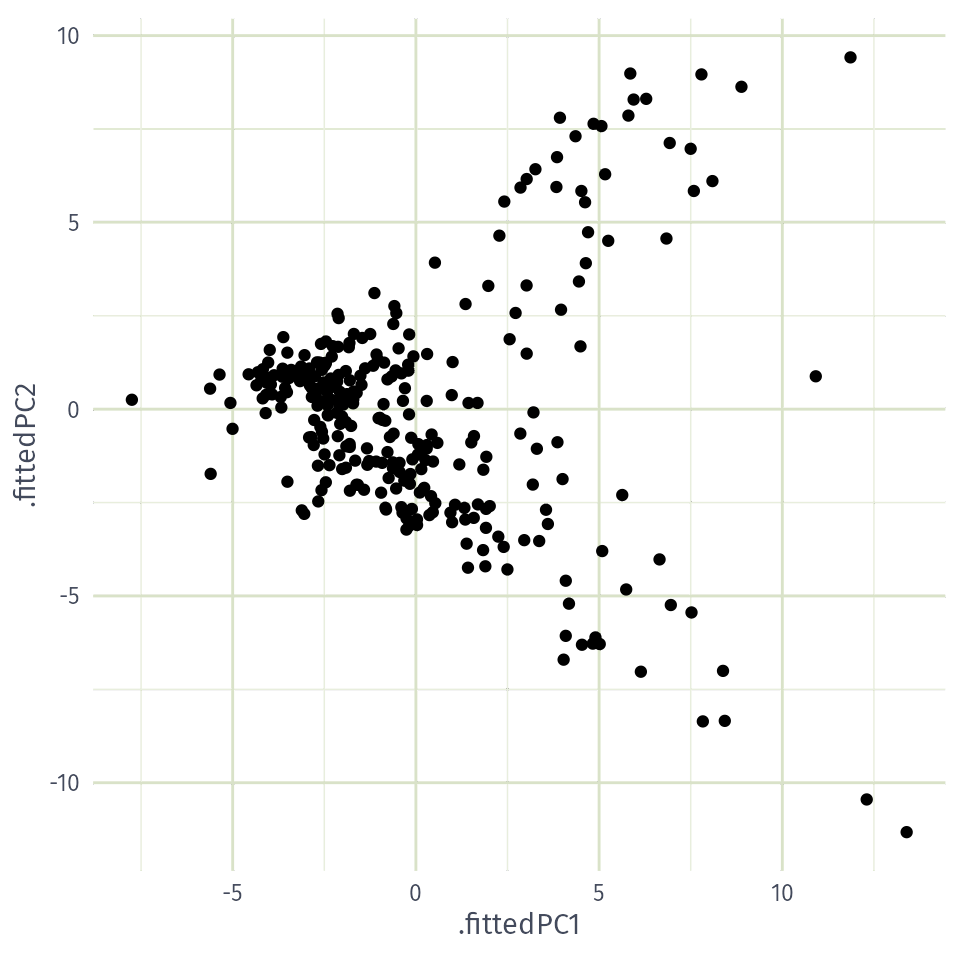
Principal components are combinations of the 48 features with the most variation, so the 304 series can be compared in two dimensions:

pcs <- tourism_features |>
  select(-State, -Region, -Purpose) |>
  prcomp(scale. = TRUE) |>
  broom::augment(tourism_features)
pcs |> select(Region, State, Purpose, .fittedPC1, .fittedPC2)
# A tibble: 304 × 5
   Region         State Purpose  .fittedPC1 .fittedPC2
   <chr>          <chr> <chr>         <dbl>      <dbl>
 1 Adelaide       SA    Business     -0.868      1.25 
 2 Adelaide       SA    Holiday       1.00       1.26 
 3 Adelaide       SA    Other         4.90      -6.11 
 4 Adelaide       SA    Visiting      0.306      1.48 
 5 Adelaide Hills SA    Business     -5.00      -0.526
 6 Adelaide Hills SA    Holiday      -0.628     -1.42 
 7 Adelaide Hills SA    Other        -0.256     -2.92 
 8 Adelaide Hills SA    Visiting     -1.80      -2.18 
 9 Alice Springs  NT    Business      1.07      -2.56 
10 Alice Springs  NT    Holiday       4.36       7.31 
# ℹ 294 more rows

PC1 vs PC2

pcs |>
  ggplot(aes(x = .fittedPC1, y = .fittedPC2)) +
  geom_point() +
  theme(aspect.ratio = 1)
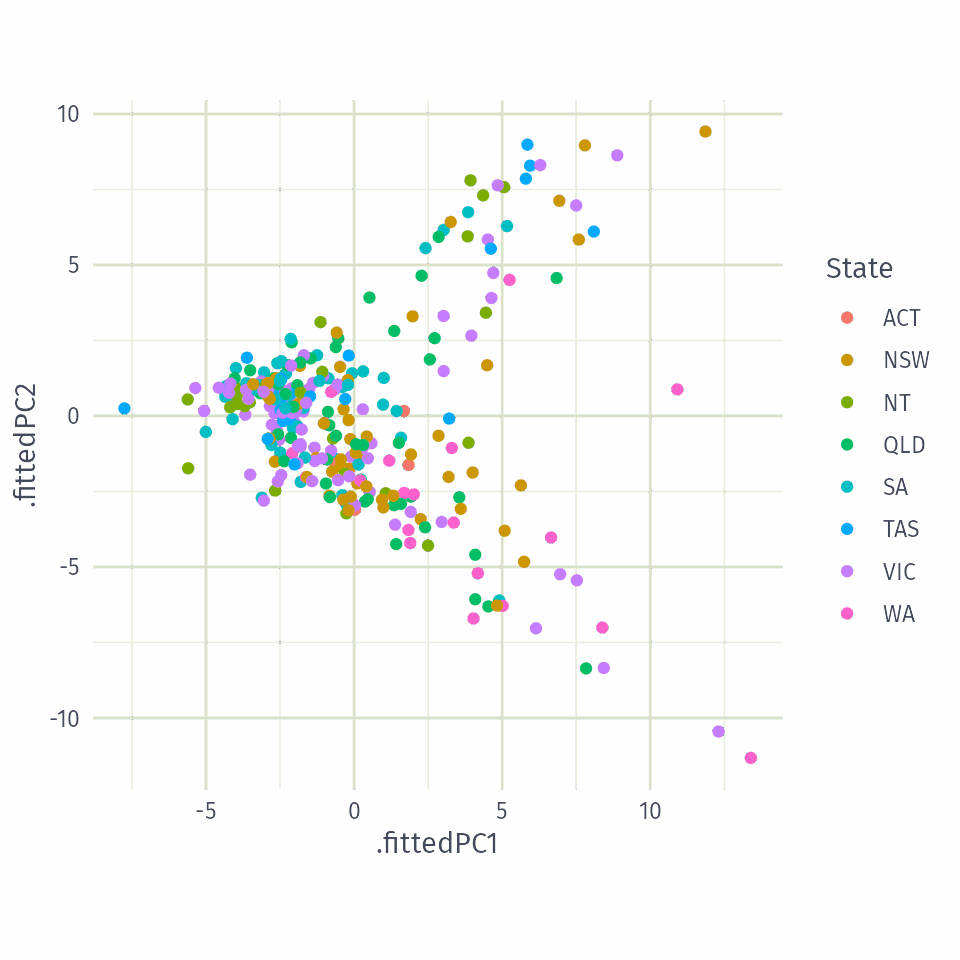
PCs coloured by State

pcs |>
  ggplot(aes(x = .fittedPC1, y = .fittedPC2,
             col = State)) +
  geom_point() +
  theme(aspect.ratio = 1)
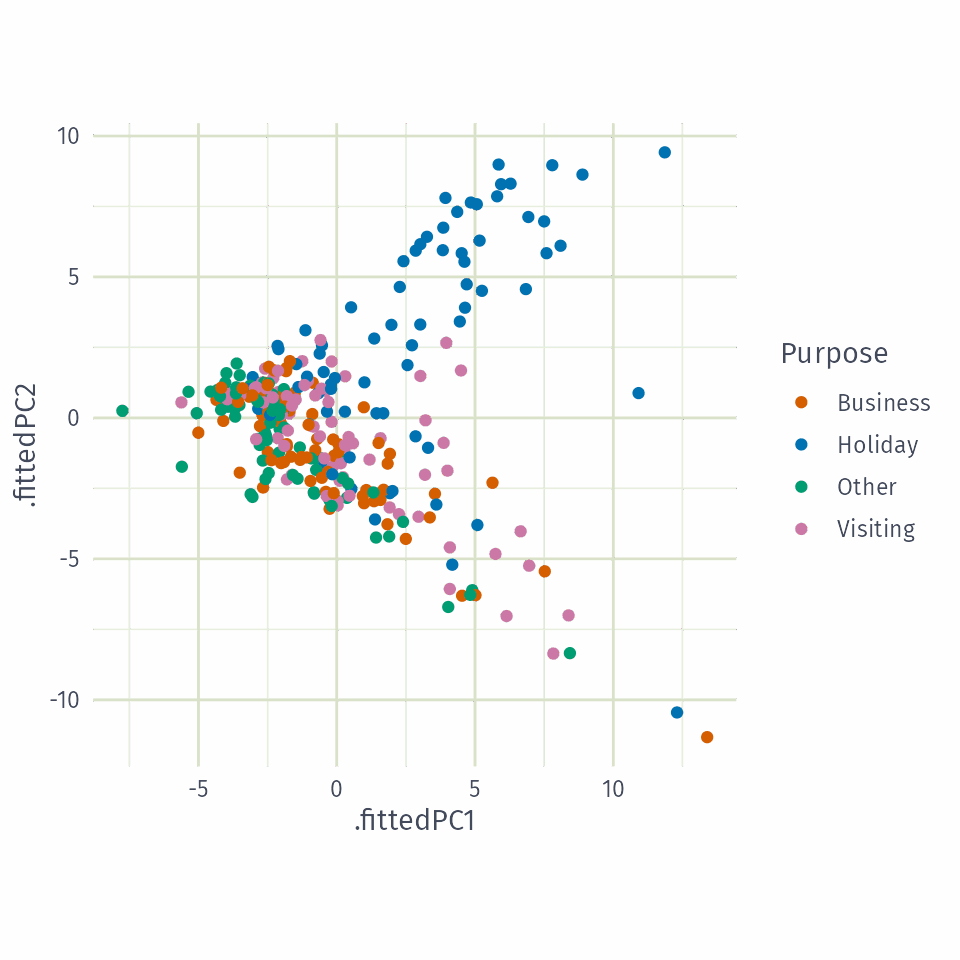
PCs coloured by Purpose

Holiday series sit higher on both PCs than other travel purposes.

pcs |>
  ggplot(aes(x = .fittedPC1, y = .fittedPC2,
             col = Purpose)) +
  geom_point() +
  theme(aspect.ratio = 1)
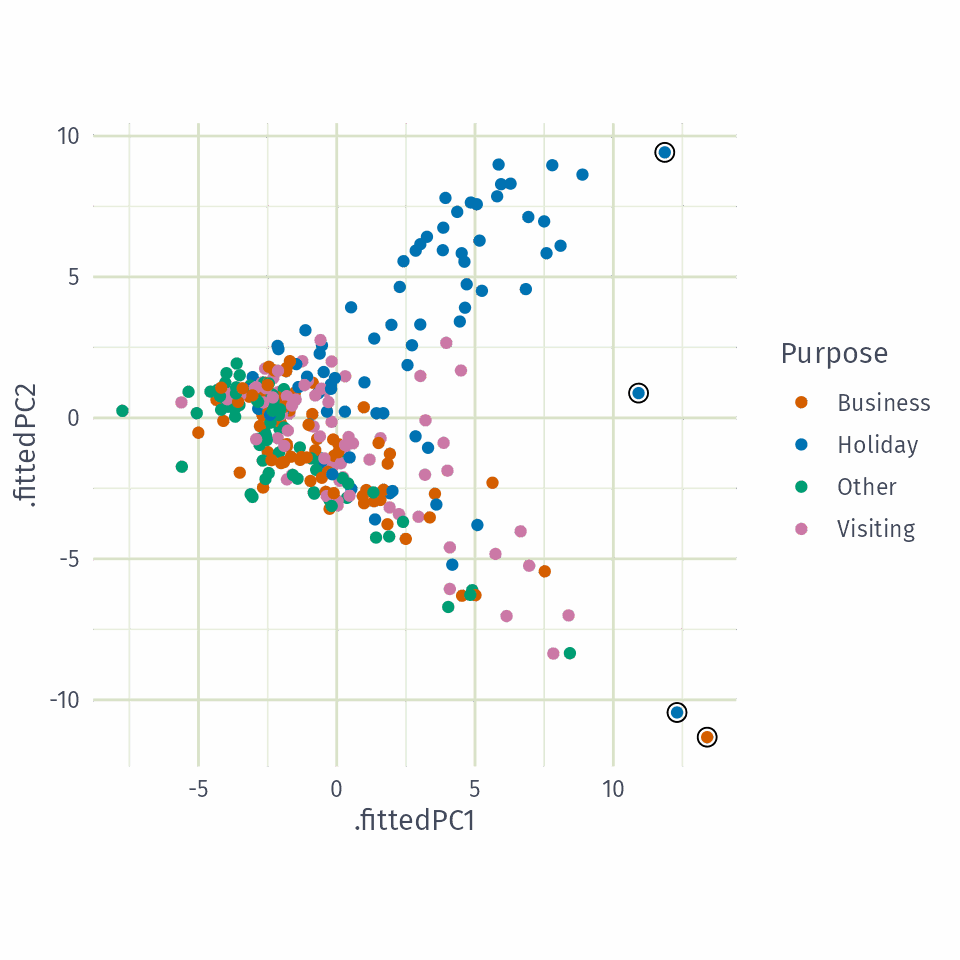
Outliers in PC space

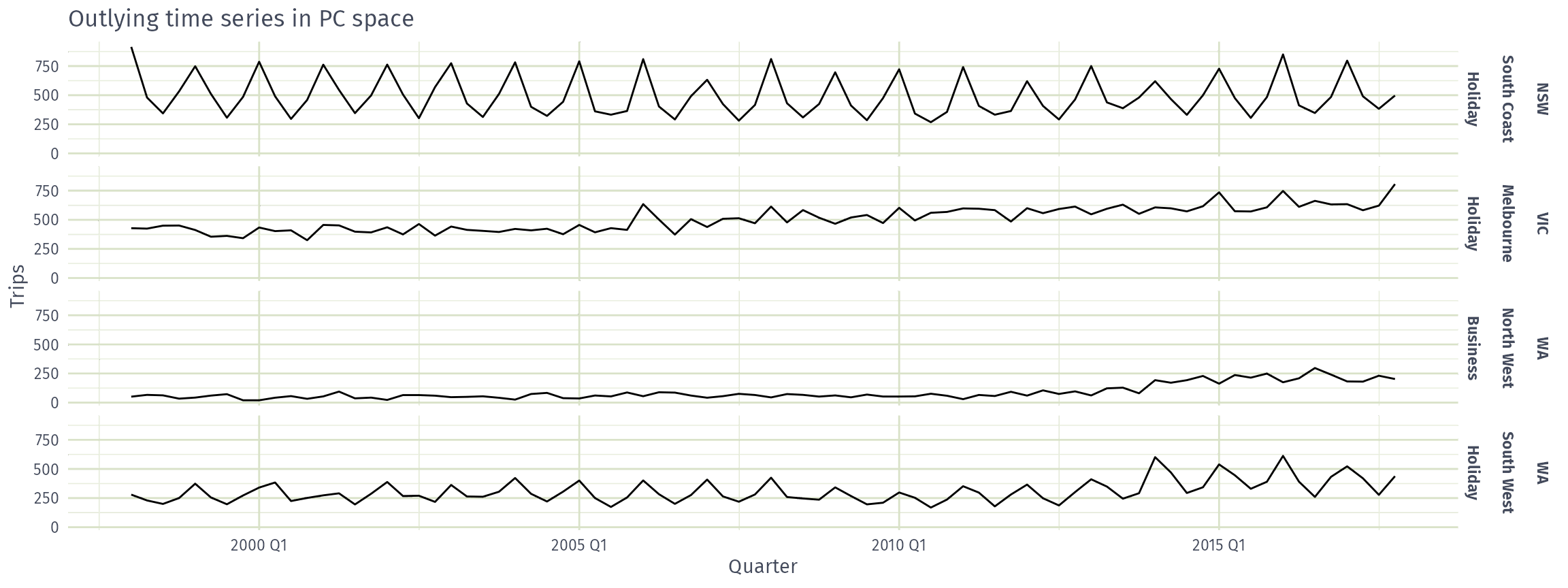
Four outlying series: PC1 > 12, or PC1 > 10 and PC2 > 0.

outliers <- pcs |>
  filter(.fittedPC1 > 12 |
           (.fittedPC1 > 10 & .fittedPC2 > 0))
pcs |>
  ggplot(aes(x = .fittedPC1, y = .fittedPC2,
             col = Purpose)) +
  geom_point() +
  geom_point(data = outliers, col = "black",
             shape = 1, size = 3) +
  theme(aspect.ratio = 1)
Outlying series

tourism |>
  semi_join(outliers, by = join_by(State, Region, Purpose)) |>
  mutate(Series = glue("{State}", "{Region}", "{Purpose}", .sep = "\n\n")) |>
  ggplot(aes(x = Quarter, y = Trips)) +
  geom_line() + facet_grid(Series ~ .) +
  labs(title = "Outlying time series in PC space")